
Plenty of homes have a turntable that hasn't turned in years: the family stereo at your parents' place, a starter deck that followed you through every move, a secondhand player sold as "tested and working". Then a record comes out that you want to hear on vinyl, and the first question is simple: will it still spin?
When an idle turntable fails, it usually fails in three places: the belt, the stylus and the connection. Most of the time nothing is broken. A consumable has reached the end of its life, or one link in the chain is missing. Checking things in order is safer than switching on and dropping the needle straight away, and it makes the real cause much easier to find.
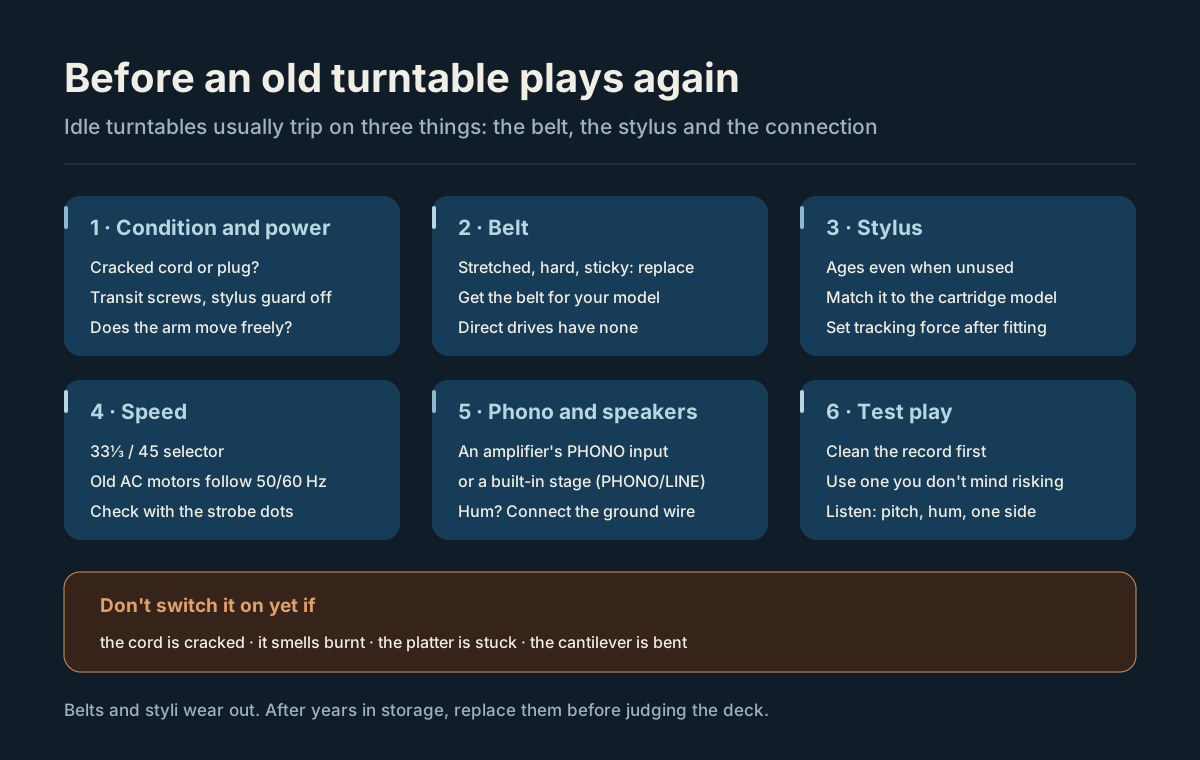
Diagram: condition and power → belt → stylus → speed → phono and speakers → test play.
Key points
- Check the power cord and plug before switching on. If the insulation is cracked, the plug is loose or you smell burning, leave it off and take it to a repair shop.
- The belt is rubber, and years of storage stretch it, harden it or turn it sticky. If the platter won't turn, starts slowly or wanders in speed, suspect the belt first. Direct-drive turntables have no belt.
- A stylus ages even when it isn't used: the rubber damper that holds the cantilever hardens over time. Treat a stylus of unknown history as close to the end of its life.
- Buy the replacement stylus by the cartridge model, then set the tracking force within the maker's range with a stylus gauge.
- On older turntables with AC synchronous motors, speed follows the mains frequency. Japan runs at 50 Hz in the east and 60 Hz in the west, so a deck that has moved across the country can run fast or slow.
- A cartridge's output is tiny and needs a phono stage (an amplifier's PHONO input, or one built into the turntable) to sound right.
- For the first play, use a clean record you don't mind risking.
Before you switch on: condition and power
With any appliance that has sat unused for years, look before you plug it in.
- Power cord and plug. If the insulation is cracked or stiff, or the plug is loose or scorched, don't switch it on.
- Transit screws. Some models lock the platter or the suspension with screws for transport. Undo them as the manual says, or the platter may not turn and the suspension won't work.
- Stylus guard. If the cartridge has a guard on, take it off gently without touching the stylus tip.
- Tonearm. Hold the finger lift on the headshell and move the arm gently. It should swing and rise without catching. When you lower the cueing lever, the arm should come down slowly; if it drops suddenly, don't use the lift over a record.
The belt: the first part to go
Most home turntables are belt-driven: the motor turns a rubber belt, and the belt turns the platter. Rubber ages, so a belt that has sat for years is usually in one of three states:
- Stretched. It slips, the platter is slow to start and runs slow, and the music drags.
- Hard and cracked. It has lost its grip, the speed wanders, and it may snap.
- Sticky or melted. It clings to the motor pulley or the inside of the platter and leaves black residue.
The fix is straightforward:
- Get a replacement belt for your turntable's model. The model is usually on a plate on the bottom or the back.
- Before fitting it, wipe the old rubber off the pulley and the platter rim with a lint-free cloth, or the new belt will slip too.
- Route the belt as the manual shows. On some models you switch between 33 and 45 by moving the belt to a different step of the pulley.
Not every turntable has a belt. A direct-drive deck turns the platter with the motor itself. Older idler-drive decks use a rubber idler wheel, which also hardens and slips with age and needs replacing or restoring.
The stylus: it ages even unused
Most people know a stylus wears out. What's easy to miss is that it ages even when it isn't played. The cantilever that carries the tip is held by a rubber damper, and that rubber hardens over time. Even with few hours on it, the sound can turn hard and tracking can suffer.
On a turntable that has been stored for years, the stylus is usually in one of three states:
- Missing. Common on secondhand decks: the cartridge or the stylus has been taken off.
- Present, history unknown. You can't tell how long it has played or whether it has been knocked. Treating it as nearly worn out is the safe choice.
- Visibly damaged. A bent cantilever, a missing tip or caked-on dirt.
To replace it:
- Find the cartridge model, usually printed on the front or side of the cartridge. If the stylus is built into the turntable, the turntable's model can lead you to the replacement.
- Buy the replacement stylus for that model. Third-party styli vary widely, so check which cartridge model they fit and the shape of the tip.
- Once it is fitted, set the tracking force within the maker's range with a separate stylus gauge, then set anti-skate to match.
For tracking force, anti-skate and how to tell a worn stylus, see Stylus and Cartridge Care: When to Replace the Stylus.
Speed: 33, 45 and the mains frequency
Start with the speed selector. LPs play at 33⅓ rpm, and most 7-inch singles at 45. At the wrong speed, the pitch is obviously too high or too low.
A less obvious cause is the mains frequency. Some older turntables use AC synchronous motors, whose speed follows the frequency of the power supply. Japan runs at 50 Hz in the east and 60 Hz in the west, and turntables like these are adapted with a different motor pulley or a switch. A deck used for years on one side and moved to the other will run roughly a fifth too fast or too slow if nobody adjusts it.
Turntables with DC servo motors or quartz-locked control are not affected by the mains frequency.
Two easy ways to check the speed:
- If the platter rim has strobe markings, watch them under the turntable's strobe lamp: when the dots look still, the speed is right. The dots come in separate rows for 50 Hz and 60 Hz, so read the row for your supply.
- Put your phone on the platter and use a speed-measuring app.
Connection: a turntable needs a phono stage
A cartridge's output is very small, and it also needs RIAA equalization to restore the right balance of frequencies. That's the job of a phono stage, or phono preamp.
So a turntable can't go straight into an ordinary audio input. The usual ways to connect one:
- An amplifier's PHONO input. Most older stereos and amplifiers have one.
- The turntable's built-in phono stage. If there's a PHONO/LINE switch on the back, set it to LINE and connect to an ordinary input or to powered speakers.
- A separate phono stage. If the amplifier has no PHONO input and the turntable has no built-in stage, put a phono stage between them.
Two mistakes are common. Without a phono stage, a LINE input gives a quiet, thin sound. With the built-in stage switched on and plugged into a PHONO input, the sound is too loud and distorted. If you hear a steady hum, connect the turntable's ground wire to the GND terminal on the amplifier or phono stage.
A turntable with built-in speakers needs none of this: switch it on and listen.
Test play: start with a record you don't mind risking
When everything is ready, play a clean record you wouldn't mind damaging, not the most precious one you own.
Listen for:
- Pitch. Does a familiar song sound too high or too low? That's speed.
- Hum. A steady low hum usually means the ground wire.
- Distortion on one side, or sound leaning to one side. Check the cartridge wiring, tracking force and anti-skate.
- Skipping or scraping. Make sure the record is clean, then check the tracking force and that the turntable is level.
If you hear a harsh scraping sound, lift the arm at once.
Records that have been stored for years need cleaning before they play, moldy ones above all. See Old Records and Mold Spots: How Clean Is Clean Enough.
When to hand it to a repair shop
Belts and styli are consumables, and replacing them solves most problems. These are better left to a professional:
- the motor still won't turn, or makes noise, with a new belt;
- the tonearm bearings catch or feel loose;
- anything wrong on the power side (a burning smell, smoke, fuses that keep blowing);
- no belt or stylus can be found for your model.
For a turntable with memories attached, a repair is often worth it. If you only want to play records, weigh the repair against a new turntable.
While you wait
You can sort the records in the meantime. With CRATTO, scan a barcode or catalog number to find the exact release on Discogs, let it shelve your records by genre or A–Z, and note the condition of each record and its sleeve separately. If you want to hear the music first, CRATTO's turntable player can play it; that needs Gold Record and an active Apple Music subscription.
FAQ
It was "tested and working", so why won't it play records?
"It turns" only tells you the motor and belt (or direct drive) work. A missing or damaged stylus, or no phono stage in the chain, leaves you with a platter that spins in silence or plays very faintly.
What if I can't find the turntable or cartridge model?
Look at the plate on the bottom or back of the turntable, then at the front or side of the cartridge. If that fails, take photos of both to a hi-fi shop or a repair shop and ask.
Can records that sat for years go straight on?
Check them for mold and dirt, and clean them first. A dirty record wears the stylus faster, and a damaged stylus harms records. See The Complete Guide to Vinyl Cleaning.
Why does the same record play at a different pitch than it did at my parents' place?
If the turntable has an AC synchronous motor and has moved between 50 Hz and 60 Hz areas, its speed changes. Swap the pulley or flip the switch as the manual says, or have a repair shop adjust it.